
Estimated time needed: 45 to 60 minutes
After completing this lab, you will be able to:
Note: Before starting with the assignment make sure to read all the instructions and then move ahead with the coding part.
To run the actual lab, firstly you need to click on the Jobs_API notebook link. The file contains flask code which is required to run the Jobs API data.
Now, to run the code in the file that opens up follow the below steps.
Step1: Download the file.
Step2: Upload it on the IBM Watson studio. (If IBM Watson Cloud service does not work in your system, follow the alternate Step 2 below)
Step2(alternate): Upload it in your SN labs environment using the upload button which is highlighted in red in the image below: Remember to upload this Jobs_API file in the same folder as your current .ipynb file
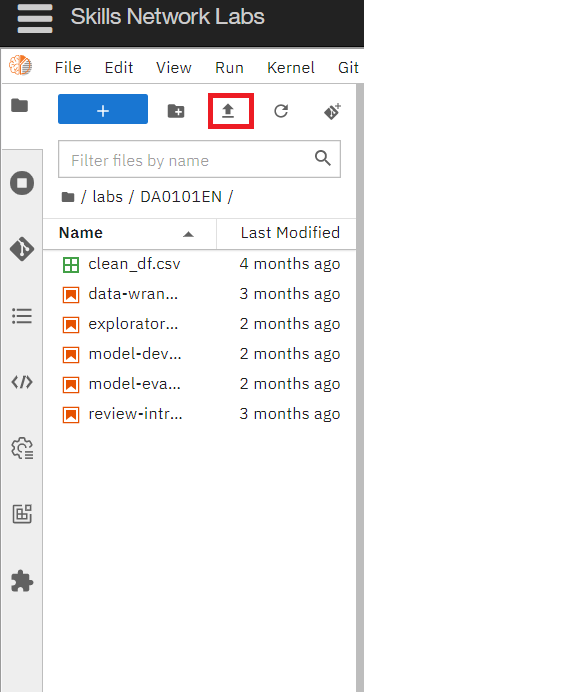
Step3: Run all the cells of the Jobs_API file. (Even if you receive an asterik sign after running the last cell, the code works fine.)
If you want to learn more about flask, which is optional, you can click on this link here.
Once you run the flask code, you can start with your assignment.
The dataset used in this lab comes from the following source: https://www.kaggle.com/promptcloud/jobs-on-naukricom under the under a Public Domain license.
Note: We are using a modified subset of that dataset for the lab, so to follow the lab instructions successfully please use the dataset provided with the lab, rather than the dataset from the original source.
The original dataset is a csv. We have converted the csv to json as per the requirement of the lab.
Before you attempt the actual lab, here is a fully solved warmup exercise that will help you to learn how to access an API.
Using an API, let us find out who currently are on the International Space Station (ISS).
The API at http://api.open-notify.org/astros.json gives us the information of astronauts currently on ISS in json format.
You can read more about this API at http://open-notify.org/Open-Notify-API/People-In-Space/
import requests # you need this module to make an API call
import pandas as pd
api_url = "http://api.open-notify.org/astros.json" # this url gives use the astronaut data
response = requests.get(api_url) # Call the API using the get method and store the
                                # output of the API call in a variable called response.
if response.ok:             # if all is well() no errors, no network timeouts)
    data = response.json()  # store the result in json format in a variable called data
                            # the variable data is of type dictionary.
print(data) # print the data just to check the output or for debugging
{'message': 'success', 'people': [{'name': 'Sergey Prokopyev', 'craft': 'ISS'}, {'name': 'Dmitry Petelin', 'craft': 'ISS'}, {'name': 'Frank Rubio', 'craft': 'ISS'}, {'name': 'Nicole Mann', 'craft': 'ISS'}, {'name': 'Josh Cassada', 'craft': 'ISS'}, {'name': 'Koichi Wakata', 'craft': 'ISS'}, {'name': 'Anna Kikina', 'craft': 'ISS'}, {'name': 'Fei Junlong', 'craft': 'Shenzhou 15'}, {'name': 'Deng Qingming', 'craft': 'Shenzhou 15'}, {'name': 'Zhang Lu', 'craft': 'Shenzhou 15'}], 'number': 10}
Print the number of astronauts currently on ISS.
print(data.get('number'))
10
Print the names of the astronauts currently on ISS.
astronauts = data.get('people')
print("There are {} astronauts on ISS".format(len(astronauts)))
print("And their names are :")
for astronaut in astronauts:
    print(astronaut.get('name'))
There are 10 astronauts on ISS
And their names are :
Sergey Prokopyev
Dmitry Petelin
Frank Rubio
Nicole Mann
Josh Cassada
Koichi Wakata
Anna Kikina
Fei Junlong
Deng Qingming
Zhang Lu
Hope the warmup was helpful. Good luck with your next lab!
Collect the number of job postings for the following locations using the API:
#Import required libraries
import pandas as pd
import json
Note: While using the lab you need to pass the payload information for the params attribute in the form of key value pairs. Refer the ungraded rest api lab in the course Python for Data Science, AI & Development link
Job Title
Job Experience Required
Key Skills
Role Category
Location
Functional Area
Industry
Role
You can also view the json file contents from the following json URL.
api_url="http://127.0.0.1:5000/data"
def get_number_of_jobs_T(technology):
    number_of_jobs = 0
    payload = {"Key Skills": technology}
    r = requests.get(api_url, params=payload)
    if r.ok:
        data = r.json()
        number_of_jobs +=len(data)


    return technology,number_of_jobs
Calling the function for Python and checking if it works.
get_number_of_jobs_T("Python")
('Python', 1173)
def get_number_of_jobs_L(location):

    number_of_jobs = 0
    payload = {"Location": location}
    r = requests.get(api_url, params=payload)
    if r.ok:
        data = r.json()
        number_of_jobs +=len(data)
    return location,number_of_jobs
Call the function for Los Angeles and check if it is working.
get_number_of_jobs_L("Los Angeles")
('Los Angeles', 640)
Call the API for all the given technologies above and write the results in an excel spreadsheet.
If you do not know how create excel file using python, double click here for hints.
Create a python list of all locations for which you need to find the number of jobs postings.
#your code goes here
loca = ['Los Angeles', 'New York', 'San Francisco', 'Washington DC', 'Seattle', 'Austin', 'Detroit']
loca
['Los Angeles',
 'New York',
 'San Francisco',
 'Washington DC',
 'Seattle',
 'Austin',
 'Detroit']
Import libraries required to create excel spreadsheet
# your code goes here
!pip3 install openpyxl
from openpyxl import Workbook
Requirement already satisfied: openpyxl in /home/jupyterlab/conda/envs/python/lib/python3.7/site-packages (3.1.1)
Requirement already satisfied: et-xmlfile in /home/jupyterlab/conda/envs/python/lib/python3.7/site-packages (from openpyxl) (1.1.0)
Create a workbook and select the active worksheet
# your code goes here
wb = Workbook()
ws = wb.active
ws
<Worksheet "Sheet">
Find the number of jobs postings for each of the location in the above list. Write the Location name and the number of jobs postings into the excel spreadsheet.
#your code goes here
ws.append(['Location','Number_of_Jobs'])

for i in loca:
    ws.append(get_number_of_jobs_L(i))
Save into an excel spreadsheet named 'job-postings.xlsx'.
#your code goes here
wb.save('job-postings.xlsx')
jobs_loca = pd.read_excel('job-postings.xlsx')
jobs_loca
| Location | Number_of_Jobs | |
|---|---|---|
| 0 | Los Angeles | 640 |
| 1 | New York | 3226 |
| 2 | San Francisco | 435 |
| 3 | Washington DC | 5316 |
| 4 | Seattle | 3375 |
| 5 | Austin | 434 |
| 6 | Detroit | 3945 |
Collect the number of job postings for the following languages using the API:
# your code goes here
languages = ['C', 'C#', 'C++','Java', 'JavaScript', 'Python', 'Scala', 'Oracle', 'SQL Server', 'MySQL Server', 'PostgreSQL', 'MongoDB']
languages
['C',
 'C#',
 'C++',
 'Java',
 'JavaScript',
 'Python',
 'Scala',
 'Oracle',
 'SQL Server',
 'MySQL Server',
 'PostgreSQL',
 'MongoDB']
wb = Workbook()
ws= wb.active
ws
<Worksheet "Sheet">
ws.append(['teachnology', 'number_of_jobs'])

for language in languages:
    ws.append(get_number_of_jobs_T(language))
wb.save('job-language.xlsx')
jobs_lang = pd.read_excel('job-language.xlsx')
jobs_lang
| teachnology | number_of_jobs | |
|---|---|---|
| 0 | C | 13498 |
| 1 | C# | 333 |
| 2 | C++ | 305 |
| 3 | Java | 2609 |
| 4 | JavaScript | 355 |
| 5 | Python | 1173 |
| 6 | Scala | 33 |
| 7 | Oracle | 784 |
| 8 | SQL Server | 250 |
| 9 | MySQL Server | 0 |
| 10 | PostgreSQL | 10 |
| 11 | MongoDB | 174 |
Ayushi Jain
Rav Ahuja
Lakshmi Holla
Malika
| Date (YYYY-MM-DD) | Version | Changed By | Change Description |
|---|---|---|---|
| 2022-01-19 | 0.3 | Lakshmi Holla | Added changes in the markdown |
| 2021-06-25 | 0.2 | Malika | Updated GitHub job json link |
| 2020-10-17 | 0.1 | Ramesh Sannareddy | Created initial version of the lab |
Copyright © 2022 IBM Corporation. All rights reserved.